GeoPic
2024
How curiosity turned into a real, interactive map tool.
Overview
GeoPic started as an idea while I was playing with maps for work. As a UX designer I needed to compare Mapbox styles at the same zoom and location, and mocking that up by hand felt tedious, so I decided to try building it. AI is pretty good these days (2024), how hard could it be?
Using ChatGPT and Mapbox, I got a map showing in a local .html file (I'd done this for work, so it was quick) and played with Mapbox styles for a while. I soon realised the project was outgrowing Notepad, so I moved into VS Code, which I wasn't familiar with (Figma's my home turf).
The first step that felt real was using AI to scatter random points around the globe. I tinkered: lines between all markers, lines between the closest five, markers within a proximity, colouring by distance. I'd always assumed mapping was a hard problem, but I had a prototype in under an hour. Fascinating.
After some mucking about, I generated markers across New Zealand. Rough and not border-accurate, but enough to prove the concept and surface ideas.
The timing was perfect. Partway through, GPT shipped beta canvas and reasoning features, and prototyping got far more efficient, I could see all my code on one canvas and edit it without copy-pasting the whole codebase.
My goal started simple: build something real that people might use. But the vision grew, location-based photography competitions, community-nominated photos from around the world, then settling on a way to show my own photos geographically. The more I built, the more inspired I got.
Getting the map running was the first milestone. I couldn't use random locations forever, and I wasn't about to commit a file every time the data changed, so I stored data in Google Sheets, which also let me paste in real locations and update on the fly. The start of a back end?
A coworker showed me VS Code's live preview, a game-changer. Before that I was clumsily building and uploading just to test.
Seeing my first functional, interactive map was incredible. No longer a mockup, it was real, I could pan around real-world locations. Mapping has always excited me, so this was a big deal.
I later found Mapbox has a built-in style preview that could have simplified my first experiment. In hindsight I'm glad I didn't know, it pushed me to learn by doing.
Second steps: making the map smarter
Adding GPS data
I stored GPS data in Google Sheets for easy updates without committing files, which also made it scalable, anyone could add to the sheet and see updates in real time.
Then I integrated real GPS data. I dug through datasets and came up empty until I found a "Cities of NZ" set, good enough for now, though people I showed thought I was building a city finder. I considered a live database but was out of my depth, and there were more exciting things to do. I first used a bounding box to zoom to clusters, but it was too big and the data too clustered to look good. Focusing on Dunedin, my home city, was a better compromise: close markers, a distinctive road layout around the Octagon, fun to test, and fitting that the software starts where I built it. Eventually I'd like it to zoom to the user's home region.
Reinventing selection
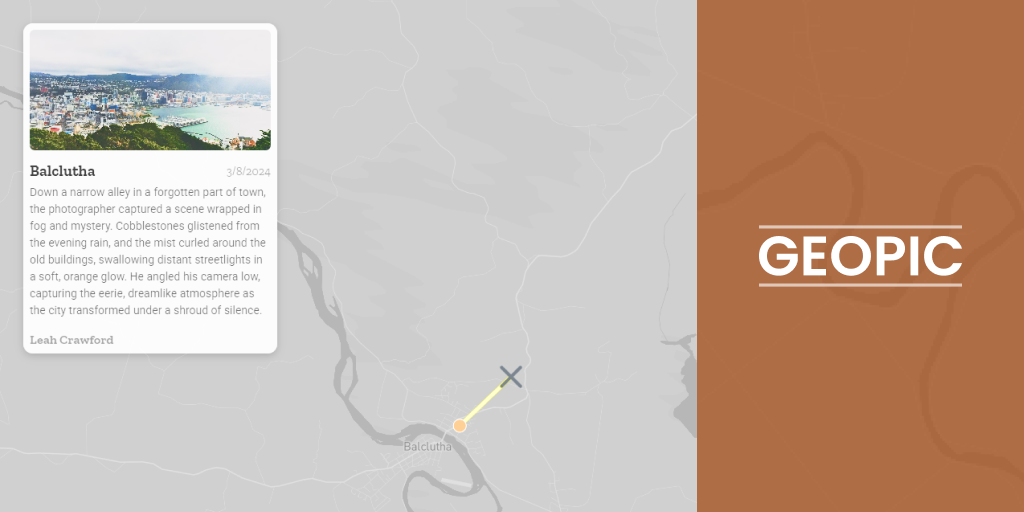
Instead of the usual click-on-marker, I wanted something different, especially for mobile. I built a system where users pan the map and points are selected by proximity. I took inspiration from a similar cursor in BattleBit Remastered.
It came with challenges. Snapping the selector line to the closest marker sometimes landed off-screen; a radius around the screen centre fell apart at extreme zooms. After sleeping on it, I took a percentage of the screen width, which worked well and felt intuitive on both desktop and mobile.
Third steps: adding interactivity
GeoPic came to life with interactivity. At first, proximity to a point just showed text at the top of the map, neat but underwhelming.
I added a dialog with a thumbnail, title, and location. Better, especially on mobile, but placing it at the bottom felt unbalanced with longer text and didn't match typical mapping layouts.
Moving the dialog to the top-right fixed it: more room for images, better styling, a cleaner design. I also added fullscreen image previews so users could view high-quality photos and navigate between them.
For depth, I let photographers add a story or blurb, and link their Instagram, adding attribution and a bit of "clout" incentive to take part.
Fourth steps: refining and polishing
Map styling
With functionality in place, I turned to visuals. I lowered the map's contrast to push focus onto the markers while keeping spatial context. A simpler map was more engaging and less overwhelming.
Animations and mobile design
I added subtle animations (a sliding dialog with a soft bounce) to make interactions feel smoother. On mobile, a sliding drawer kept the dialog from taking over the screen.
One idea I didn't get to was a scroll cue, like showing half an image in the drawer. A nice touch for a future iteration.
What I learned
Unexpected joy in building
What surprised me most was how invested I got, jotting down ideas day and night. Creating something functional, not just designing it, was hugely rewarding.
The power of AI and tools
This wouldn't have been possible for me a few years ago. ChatGPT and recent AI advances make it far easier for people like me, who understand the concepts but lack deep coding skills, to bring ideas to life.
The role of UX knowledge
My UX experience was invaluable. It helped me communicate ideas, whether through mockups or CSS tweaks, and articulating problems and solutions sped up development.
GeoPic has been a journey of curiosity, creativity, and growth. It's far from perfect, but it's real, and that's what makes it exciting. Whether it ends up hosting photography competitions or something else, it's proof of what's possible when you dive in with an open mind and the right tools.
Visit GeoPic
Want to try it? Explore the live GeoPic demo. It's live now, so go have a play.
Cheers, Griff